
 PomoZentra
How to run a week you can actually check afterwards.
A practical walkthrough: name your work areas, commit blocks to them before the week starts, answer one honest question at the end of each block, and read the gap on Wednesday instead of Friday. Works on paper. Works faster in PomoZentra.

Who this guide is for
It assumes you decide your own week. If someone else fills your calendar, most of this won't apply.
Written for
- Founders splitting a week between selling and building, see for founders.
- Freelancers whose income depends on how much of the week reaches billable work, see for freelancers.
- Consultants whose pipeline disappears during a busy delivery stretch, see for consultants.
- Creators who publish, then lose the next week to everything except publishing, see for creators.
Not written for
- Teams that need shared boards, assignees or seats.
- Anyone billing clients by the hour, that's a time tracker's job, not this.
- Days made entirely of meetings you don't control. There's nothing to plan blocks against.
You can still read on. The planning half works with a notebook.
The problem this guide solves
Not "I don't work enough hours." Almost nobody's problem is hours.
A normal week goes like this. On Monday you know what matters, closing two deals, shipping the release. By Wednesday afternoon three urgent things have arrived, all of them real, none of them the thing you named on Monday. You work a full, tiring day.
On Friday you genuinely cannot say whether the week went where you meant it to. Your timer says you focused for twenty-eight hours. That's true, and it answers a question nobody asked.
The information you needed was available twice, and both times it wasn't written down: on Monday when you decided, and at the end of each block when you knew whether it moved.
Reconstructing it on Friday produces the version that felt true. So the fix isn't more tracking, it's capturing a decision up front, and a one-tap answer at the only moment you actually know it.
What it costs to leave this alone
The avoided work stays avoided
Every week has one area that's uncomfortable, usually sales, or the hard technical piece. With no per-area record, skipping it four weeks running feels like four busy weeks, not a pattern.
Planning never improves
If you don't know that you planned six Delivery blocks and matched two, next Monday's plan is the same optimistic guess. The error repeats because it was never visible.
You correct too late
A gap noticed on Friday is a post-mortem. The same gap noticed on Wednesday is just Thursday's plan, adjusted.
Eight terms you'll need
All of them are used in the steps below.
- Work area
- A lasting bucket of work, Revenue, Delivery, Admin, Learning, Personal, Waste. Six is the default; you rename them to match your work.
- Focus area
- The one to three work areas that matter most this week. It changes weekly; a work area doesn't.
- Block
- One focus round. 25 minutes by default, and every length is editable.
- The plan
- How many blocks each work area should get, on each day, decided before the week runs.
- The honest check
- The question at the end of each block: did this move the area forward? Yes, partly, or no. Partly counts as half.
- Plan alignment
- Of the blocks you planned per area, how many you matched. Capped per area, so surplus in one can't fill a gap in another.
- Weekly focus share
- Of everything you logged, how much landed in this week's focus areas.
- Output
- Optional. A countable unit of work, proposals sent, posts published, with a weekly target. Skip it for your first two weeks.
Before you start
Five minutes of preparation. Missing any of these is where people stall halfway through step three.
- A week you mostly control. Some meetings are fine. A calendar owned by someone else is not.
- An honest count of your working days. Five is the default. If you genuinely work six, say six. The daily target is derived from this.
- A rough sense of how many blocks a day you actually run. Not your best day. Your normal one. Most people land between four and eight.
- Names for your work areas in your own vocabulary. "Client work" beats "Delivery" if that's what you call it.
- Somewhere to run the timer. A browser tab is enough, no install, and no account needed to try it.
You do not need
A task-manager migration, a calendar integration, historical data, a team agreement, or a paid plan. This guide starts from an empty week, and everything in it is free during early access.
The seven steps
Step 1 is setup you do once. Steps 2 and 3 happen every Monday and take about four minutes together. Steps 4 and 5 repeat inside every block and cost one tap. Step 6 is a Wednesday correction, step 7 a Friday close.
Name your work areas
Once, at setup · about 2 minutes
Write down every kind of work your week contains, then compress it to about six buckets. Include one for waste. Six isn’t a rule, but three is too coarse to show a pattern and twelve is too many to plan against.
Rename any of them. Waste stays. An area you never log is an area you're hiding.
Choose this week’s focus areas
Every Monday · about 1 minute
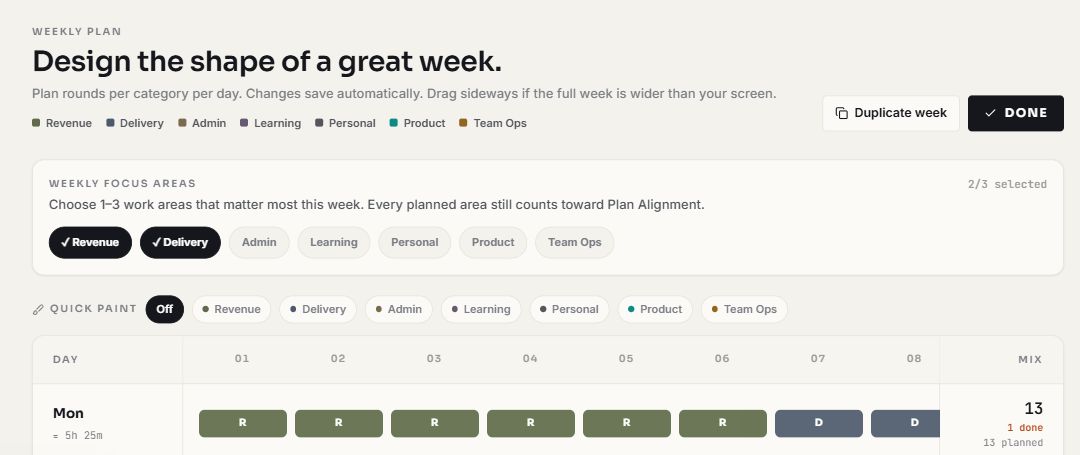
Pick one to three areas that matter most this week. Not the ones you’ll spend the most time in. The ones the week would be a failure without.
Every planned area still counts toward alignment. Focus areas get the second number, weekly focus share.
Lay out the blocks, day by day
Every Monday · about 3 minutes
For each working day, decide how many blocks each area gets. Plan a normal day, not a heroic one, if you usually run six, plan six. Leave room for the unplanned; something always arrives.
Selling front-loaded, building protected midweek. Plan a normal day, not a heroic one.
Run a block
Repeats all week · no extra effort
Pick the task, start the countdown, work until it stops. Take the break, it’s part of the method, not a reward.
Change focus or break length any time, it won't reset the block you're in.
Answer the honest question
Repeats all week · about 3 seconds
Choose the area the block belonged to, then answer: did this move it forward? Yes, partly, or no. Answer for what happened, not for what you intended.
A fixed weight in the same arithmetic, not a mood rating read back to you later.
Read the gap mid-week and correct it
Wednesday · about 2 minutes
Look at alignment per area, not the total. Find the area furthest behind its plan and move blocks to it for the rest of the week. Don’t fix it by adding blocks to a day that’s already full.
The third Admin block ran, but stops at the cap, surplus never fills the Delivery gap.
Close the week and reuse what worked
Friday · about 3 minutes
Ask one question: was the gap an execution problem or a planning problem? If you missed Delivery three weeks running, the plan is wrong, not you. Adjust next week’s numbers down to what you actually do.
Once a shape holds twice, save it. Re-deciding every Monday is a tax with no return.
What a finished plan looks like
Two worked examples. Both are illustrations, not customer data.
A founder's week
Focus areas: Revenue, Delivery. Eight blocks a day, five days.
| Day | Rev | Del | Adm |
|---|---|---|---|
| Mon | 6 | 1 | 1 |
| Tue | 5 | 2 | 1 |
| Wed | 2 | 5 | 1 |
| Thu | 2 | 5 | 1 |
| Fri | 3 | 3 | 2 |
Selling front-loaded while the week is fresh; building protected midweek. Admin is planned, not pretended away.
A freelancer's week
Focus areas: Sales, Client work. Six blocks a day, five days.
| Day | Sales | Client | Adm |
|---|---|---|---|
| Mon | 2 | 3 | 1 |
| Tue | 1 | 4 | 1 |
| Wed | 2 | 3 | 1 |
| Thu | 1 | 4 | 1 |
| Fri | 2 | 2 | 2 |
A small, non-negotiable sales block every single day. The pattern that survives a busy delivery week.
Six ways people get this wrong
Every one of these produces a number that looks like a failure but is really a setup error.
Planning the week you wish you had
Twelve blocks a day when you run six. Alignment then reports 50% forever and you conclude the method is broken. Plan your median day, not your best one.
Making everything a focus area
If all six areas are this week's priority, weekly focus share sits near 100% permanently and tells you nothing. Cap it at three. Two is better.
Rounding every block up to "yes"
Nobody else sees this. Answering honestly is the only thing that makes the number yours; inflating it just buys a nicer-looking chart with your own information.
Rewriting the plan to match the day
Editing Monday's plan on Thursday so it agrees with what happened turns the comparison into a formality. Correct forward, change Friday, not Tuesday.
Turning on outputs in week one
Output targets are useful once your block habit is stable. Added on day one they're a second new habit, and the first one dies.
Judging it after three days
Three days is a mood. The wins-and-leaks readout won't even conclude anything until ten blocks are logged in the window, give it two weeks before deciding.
What makes the result better
Plan Monday morning, not Sunday night
Sunday plans are written by someone who isn't working yet, and they're consistently too ambitious.
Protect one area midweek
Pick the day your hardest area gets a majority of blocks, and defend it. Alignment makes the cost of giving it away visible.
Log waste on purpose
It costs one tap and nothing else. Waste is counted, never subtracted, so an honest label is free. The point is that the hour doesn't get filed as Admin, which would leave the rest of the numbers lying to you.
Leave one or two blocks unplanned
A day planned to the last block is a day that breaks on first contact with reality.
Use "partly" freely
It isn't a soft failure; it's the honest answer for most real work, and it's worth exactly half a block in the same arithmetic.
Duplicate the weeks that worked
Once a shape holds twice, save it. Re-deciding your week from scratch every Monday is a tax with no return.
Doing this without the app, and what changes with it
The practice is the valuable part. You can run it on paper this week.
If the paper version works for you, keep it, genuinely. The app exists because the daily arithmetic is exactly the part people stop doing in week three, and once that stops, the whole loop stops with it.
Setup checklist
Work down it once. If every line is true, the numbers you get will mean something.
- Six work areas named in your own vocabulary, including one for waste.
- One to three focus areas chosen for this week, not four.
- Blocks planned per area, per day, for a normal day rather than a heroic one.
- Working days set honestly (five by default). The daily target derives from it.
- One or two blocks left unplanned each day for whatever arrives.
- The honest check answered on every block for two full days.
- Waste logged at least once, if it has never appeared, you aren't logging honestly.
- A Wednesday reminder to read alignment while the week can still change.
- Outputs left off until the block habit is stable.
You're ready when
You can open the app on a Wednesday afternoon and answer, without thinking, which single area is furthest behind its plan, and you know which blocks on Thursday you're going to move to fix it.
That's the whole outcome. Everything else on this page is in service of that one moment.
How to tell whether it's working
Read these in order. The first is about the habit; the last is about your week.
Answered blocks per day
The habit metric, and the only one that matters in week one. If most blocks end without an answer, nothing downstream is trustworthy yet.
Good looks like: nearly every block carrying an area and an answer.
Plan alignment, per area
Read the rows, not the total. One area consistently below the rest is the finding, that's the week telling you what you avoid.
Good looks like: a day clearing 70%, which is the threshold for it to join your streak.
Weekly focus share
Whether the week's attention actually reached the one to three areas you named. It can be low even on a perfectly aligned week, which means the plan itself under-served your priorities.
Good looks like: a share that matches the share you planned.
The plan-to-reality gap, over time
After two or three weeks, check whether you consistently plan more than you run. That's the number that improves your planning rather than your effort.
Good looks like: the gap shrinking because the plan got realistic.
One caveat worth stating plainly: alignment measures whether you did what you said, not whether what you said was the right call. A perfectly aligned week on the wrong priorities is still a wasted week. That judgment stays yours.
When it isn't working
Questions about running the week
How long does the whole routine take?
About five minutes on Monday to plan, three seconds per block for the honest check, and roughly two minutes on Wednesday to read the gap. There's no daily journal and no end-of-week form.
What if my week explodes on Tuesday?
Log what actually happened, including the unplanned work. A blown-up week with an honest record is far more useful than a tidy plan you quietly abandoned, and the pattern of what keeps exploding is itself the finding.
Do I have to use 25-minute blocks?
No. Focus length, break length and rounds before a long break are all editable, and changing them doesn't reset the block you're in. What matters is that a block is a consistent unit for you.
Which step should I keep if I only do one thing?
Keep steps 3 and 5, plan the blocks, answer the question. Those two produce every number on this page. Everything else improves them.
Can I do this without the app?
Yes, and the comparison table above shows exactly how. The part people abandon by week three is the daily arithmetic, which is the part the app does for you.
When should I turn on outputs?
Once you've logged two stable weeks. Then set a weekly target for a countable unit, proposals sent, posts published, and the daily target is calibrated from your own weekly goal rather than a fixed number.
Do I need an account to follow this guide?
You can use the timer and tasks as a guest. Sign in free to create the weekly plan used by this guide, review Plan Alignment and reports, export CSV or JSON, and sync across devices.
How many weeks before this is worth judging?
Two, minimum. Week one teaches you to answer the question; week two is the first one whose plan was informed by real data.
What to do next
If due dates, reminders, subtasks and device-first task management are the main requirement, compare Focus To-Do and PomoZentra before moving your task list.
Plan this week →
Open the app and work through steps 1 to 3. Five minutes, no account required, free during early access.
Read why it's built this way →
The method page covers the reasoning behind per-area caps, the three-answer check and the derived daily target.
Go deeper on the honest check →
Why "partly" counts as exactly half, and why a yes/no version of the question fails first.
Start with Monday.
Name six areas, pick two that matter, plan the blocks. The rest of the guide happens one tap at a time.