
 PomoZentra
The engagement ends. Does the next one exist yet?
Billable delivery always outranks finding the next engagement, until the current one finishes and the gap between contracts is the whole problem. PomoZentra makes you plan blocks for both and shows, week by week, which one your attention really served.
Free. No credit card required, and no paid plan.
Your week, as it actually runs
Your work arrives in engagements with a start and an end, and the end is always closer than it feels. During delivery every hour has a client attached to it, which makes business development the easiest thing to postpone and the most expensive thing to lose. The classic consultant cycle is not a marketing problem. It is a scheduling problem: the pipeline work never gets planned, because during a busy engagement nothing unbilled ever does.
The one question this answers
Of the blocks you planned for each area this week, how many did your attention actually reach? Everything else on this page is in service of that.
What keeps going wrong
Four patterns specific to consultants. If none of these are familiar, this is probably not the tool for you.
Business development is always next week
It has no client waiting and no deadline, so it loses every scheduling conflict for the entire length of an engagement.
The gap between contracts is invisible until it arrives
The cost of a quiet fortnight of pipeline work shows up two months later, long after the decision that caused it.
Utilisation says nothing about the future
A fully utilised month can be the month you guaranteed an empty one, and a utilisation figure cannot show you that.
Delivery expands to fill the week
Without a planned ceiling, one engagement quietly takes every block, including the ones you meant to spend elsewhere.
What changes
Stated as what becomes visible, not as a percentage improvement we have not measured on your work.
The parts that matter for consultants
The product has more in it than this. These are the four that earn their place in your week.
Business development on its own line
Scored separately with credit capped per area, so a heavy delivery week cannot report as a good week when the pipeline got nothing.
A ceiling on delivery
Planning delivery blocks gives the engagement a boundary. When it overruns, the overrun is a visible number rather than an assumption.
Week templates per engagement phase
Discovery weeks, build weeks and wind-down weeks have different shapes. Save each one and apply it rather than re-deciding.
A private record, not a timesheet
Nobody else sees this. It is not a utilisation report for a client or an employer, which is exactly why the answers stay honest.
What you would actually use it for
- Hold two business development blocks a week through the busiest engagement
- See how much of a delivery week went to the work you actually scoped
- Plan the wind-down of an engagement alongside the search for the next
- Notice the phase where admin quietly doubles
- Check whether a retainer is consuming more than it is worth
Where it sits in your week
Five minutes on Monday, one tap per block, two minutes on Wednesday.
- MONDAYSet Delivery and Business development as this week's focus. Plan blocks for both, including at least one BD block on a delivery-heavy day.
- EVERY BLOCKRun the timer, pick the area, answer whether it moved forward.
- WEDNESDAYIf BD is at zero, move a block now. It is the only area nobody else will chase you about.
- FRIDAYLook at the shape of the week. If delivery consistently overruns its plan, that is a scoping conversation, not a personal failing.
What it looks like
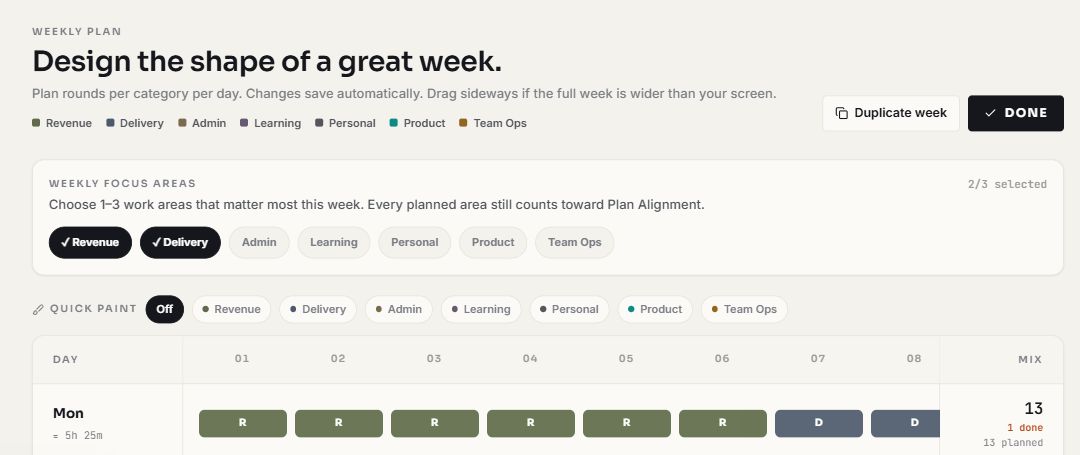
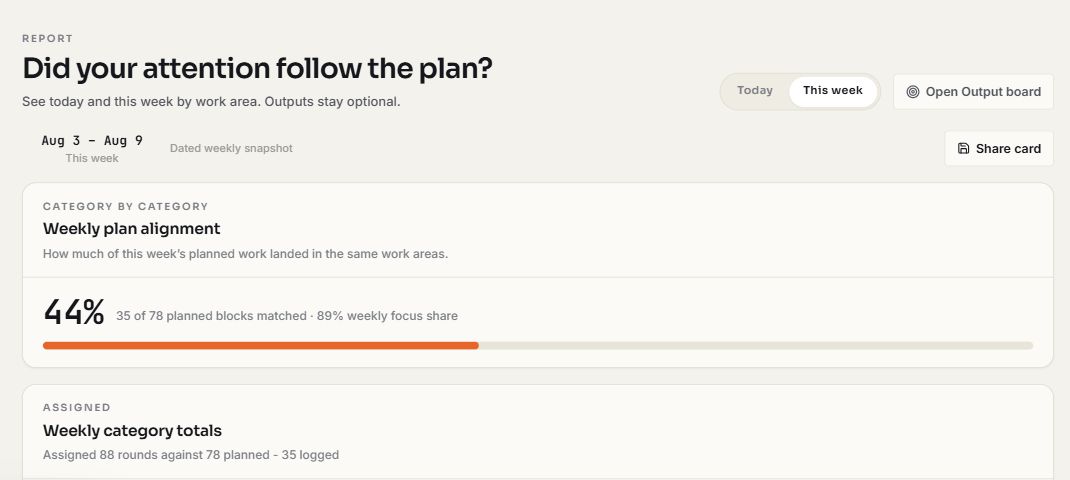
Current product views show the decision before the week and the comparison after focus has been logged.
Compared with how you work now
Not competitors, methods. Most consultants are using one of these.
A worked consultant week
Delivery and Business development as focus areas, seven blocks a day. Delivery is planned at five a day, BD at one, admin at one. By Thursday delivery has taken six a day and BD has had a single block all week. The delivery surplus is counted but capped, so alignment reports the BD shortfall rather than averaging it away. The finding is not that you worked too little. It is that the engagement has no ceiling, and next quarter will pay for it.
An illustration worked through the real scoring rules, not customer data.
What we cannot show you yet
No testimonials, no case studies and no user counts. PomoZentra is new, and inventing social proof would undo the one thing this product is built on. What you can check instead: the scoring formula is published in full on the method page, and the timer runs without an account, so you can put one real week through it and judge the number yourself.
When there are consultants willing to be quoted, they will appear here with their name and their permission, not as an anonymous claim.
The tools you already use
Nothing is connected
There are no integrations and no public API. PomoZentra does not read your calendar, your task manager or your inbox, and nothing is pulled in automatically. Google is used for sign-in and nothing else.
What that means in practice
Your existing tools stay exactly where they are. This sits beside them and asks for one tap at the end of each block. If you need it to sync with your stack, it is the wrong tool and there is no roadmap that changes that soon.
Questions from consultants
Is there a consultant template?
Not a dedicated one. There are Founder, Freelancer and Creator presets, and Custom. Start from Custom and set Delivery, Business development, Admin, Learning, Personal and Waste. It takes about a minute, and we would rather say that than pretend a preset exists.
Can I report utilisation to a client?
No. There is no client-facing report, no rate and no export designed for billing. This is a private record of your own attention.
I work on site with a client. Does that break it?
Partly, yes. If your day is set by someone else's schedule, there is less for the method to measure. It still works for the hours you control, which for most consultants is early morning and the gaps between.
Can I track multiple engagements separately?
Not as separate clients. You could name work areas per engagement during a long project, but that is a workaround rather than a feature.
Does it replace my CRM?
No. It does not store contacts, deals or follow-ups. It only measures whether pipeline work got any of your week.
See the calculation. Then shape it around your week.
Move from the core method to one practical starting point, or check the product facts before you begin.
Plan one week and see.
Five minutes on Monday is the whole commitment. By Wednesday afternoon you will know something about your week that you did not know before.